Ritorno
Tech 5 min di lettura - 15 mag. 22 - Mayeul Le Monies de Sagazan

Trovare l'origine di un bug in modo efficace con git bisect

Vuoi trovare rapidamente il commit che ha introdotto un bug nella tua base di codice ma hai diverse centinaia, o migliaia di commit? git bisect è probabilmente lo strumento che fa per te.

La teoria

In inglese bisect significa "Dividere in due", ed è esattamente ciò che fa git bisect:
  • gli si dà un commit "buono", cioè un commit dove il bug non era ancora presente;
  • poi, gli si dà un commit "cattivo" (spesso il commit attuale);
  • infine, finché git bisect trova diversi commit tra il commit "buono" e quello "cattivo", prende il commit intermedio tra i 2 e ti chiede se questo commit va bene.
Il vantaggio di utilizzare una ricerca binaria è che si sa quante fasi al massimo saranno necessarie per trovare il commit che ha introdotto il bug, e che questo numero di fasi aumenta solo di 1 ogni volta che il nostro numero di commit sospetti raddoppia.
Ad esempio il codice di Linux contiene più di 1 milione di commit, eppure sarebbero necessarie al massimo solo 20 fasi (logaritmo binario di 1 000 000) per trovare il commit che introduce un bug!
Ecco per la teoria, ora vedremo come usare questo strumento in pratica.

La pratica

Per mostrare l'utilizzo di git bisect, useremo questo repository git (che contiene un bug).
Cominceremo scaricando il codice:
git clone https://github.com/mle-moni/bisect-test
Il file test.js contiene questo codice:
// numbers is an array of numbers
function getNumber(numbers, index) {
    if (!numbers[index]) {
        throw new Error('no number for this index')
    }
    return numbers[index]
}
const numbers = [ 42, -121, 4235, 0 ]
const index = process.argv[2]
console.log(`number is ${getNumber(numbers,index)}`)
Il comando seguente ci permetterà di sapere se il commit contiene il bug o meno:
node test.js 3
(considereremo il commit come errato se questo comando restituisce un errore)
Ora vediamo quali commit sono stati fatti:
# montre la liste des commits avec leur auteur du plus ancien au plus récent
git shortlog
LE MONIES DE SAGAZAN Mayeul (28):
      no bug here
      no bug here too
      no bug here too
      no bug here too
      no bug here too
      no bug here too
      no bug here too
      no bug here too
      no bug here too
      no bug here too
      bug introduction
      we still don't know that there is a bug
      we still don't know that there is a bug
      we still don't know that there is a bug
      we still don't know that there is a bug
      we still don't know that there is a bug
      we still don't know that there is a bug
      we still don't know that there is a bug
      we still don't know that there is a bug
      we still don't know that there is a bug
      we still don't know that there is a bug
      we still don't know that there is a bug
      we still don't know that there is a bug
      we still don't know that there is a bug
      we still don't know that there is a bug
      we still don't know that there is a bug
      we just discovered that there is a bug
      Create README.md
Il nostro obiettivo sarà, con git bisect, di trovare che il commit difettoso è proprio quello che porta il nome "bug introduction".
Si parte!
git bisect start
# on choisit un commit où il n'y avait pas le bug (ici, c'est le premier commit du dépôt git)
git bisect good 0f436453aac33b7d39f04be33b909097b34def10
# on précise que le commit actuel est mauvais
git bisect bad
Lo strumento ci sposta quindi sul commit tra quello buono e quello errato:
Bisecting: 13 revisions left to test after this (roughly 4 steps)
[fb045ac20c5972136afd8c10e510c0483f97b1a9] we still don't know that there is a bug
In seguito si testa il codice (qui è facile perché è JavaScript, spesso avremo una fase di compilazione):
node test.js 3
Error: no number for this index
Questo commit contiene il bug, diremo quindi a git bisect che il commit è errato:
git bisect bad
Bisecting: 6 revisions left to test after this (roughly 3 steps)
[991ef4bb20a5d29cc6a307dd3a289a5fc3159c3d] no bug here too
In seguito si continua questa routine fino a trovare il commit errato!
node test.js 3
number is 0
git bisect good
Bisecting: 3 revisions left to test after this (roughly 2 steps)
[bc4dd976f1b8e7e79a7109ac074b610dddcf6dd5] no bug here too
node test.js 3
number is 0
git bisect good
Bisecting: 1 revision left to test after this (roughly 1 step)
[f1a089670548b09e2b52737aa05aa25921ee463f] we still don't know that there is a bug
node test.js 3
Error: no number for this index
git bisect bad
Bisecting: 0 revisions left to test after this (roughly 0 steps)
[9d7a3917e0fdfc71be8426f19ccf26b217d0f546] bug introduction
E infine:

node test.js 3
Error: no number for this index 
git bisect bad
9d7a3917e0fdfc71be8426f19ccf26b217d0f546 is the first bad commit
commit 9d7a3917e0fdfc71be8426f19ccf26b217d0f546
Author: LE MONIES DE SAGAZAN Mayeul 
Date:   Sun May 15 14:45:17 2022 +0200
    bug introduction
test.js | 3 +++
1 file changed, 3 insertions(+)
Infine possiamo vedere quali cambiamenti hanno causato l'apparizione del bug:
git diff HEAD^
function getNumber(numbers, index) {
+       if (!numbers[index]) {
+               throw new Error('no number for this index')
+       }
        return numbers[index]
 }
Qui il "bug" era quindi la condizione
if (!numbers[index]) {
poiché numbers[index] può essere 0 e che !0 dà true, sarebbe stato necessario essere più precisi e mostrare l'errore solo se numbers[index] era undefined :
if (numbers[index] === undefined) { 

Casi particolari

Se uno dei commit non può essere testato (se ad esempio non fa il build), abbiamo diverse soluzioni:
  • scegliere manualmente un altro commit:
git reset HARD~2 # posizionarsi su 2 commit prima di quello scelto da git bisect
  • lasciare che git bisect scelga il prossimo commit:
git bisect skip
Se si desidera interrompere la ricerca binaria si può fare semplicemente:
git bisect reset
Ecco, è tutto per lo strumento git bisect!

Bonus

Se vuoi avere la possibilità di guardare i diff con VS Code pur continuando ad avere gli strumenti di git (rebase, merge, ...) in CLI con vim, è possibile configurando git difftool.
Ecco ad esempio la mia configurazione ~/.gitconfig
[core]
    editor = vim
[user]
    name = LE MONIES DE SAGAZAN Mayeul
    email = mail@example.com
[diff]
    tool = vscode
[difftool "vscode"]
    cmd = code --wait --diff $LOCAL $REMOTE
In seguito è sufficiente usare git difftool allo stesso modo in cui si usa git diff:
git difftool HEAD^
Launch 'vscode' [Y/n]? Y
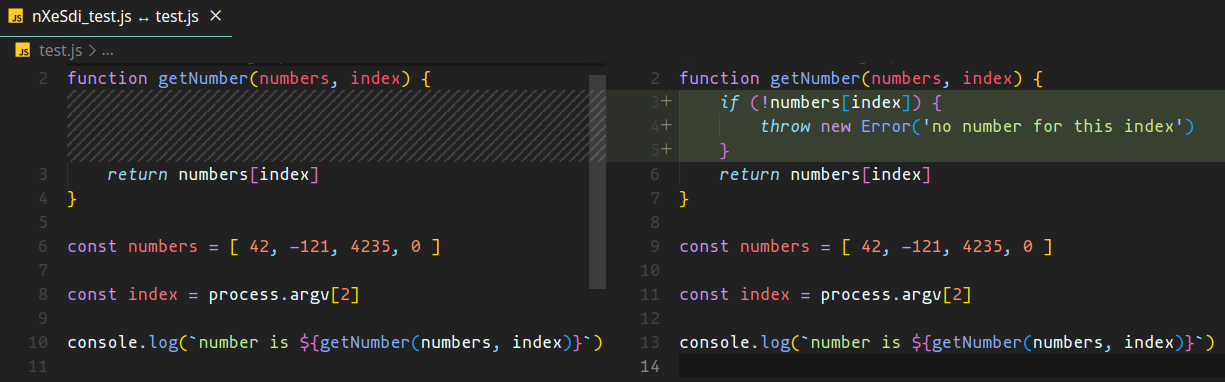
git difftool example

Desideri essere accompagnato per lanciare il tuo progetto digitale ?

Invia il tuo progetto ora